> ## Documentation Index
> Fetch the complete documentation index at: https://docs.atomcommerce.io/llms.txt
> Use this file to discover all available pages before exploring further.
# Offer Priority and Stacking
> Learn how Atom Commerce evaluates discounts by class and priority, how qualifier sharing works, and how overlapping offers affect gift, BXGY, and free shipping behavior.
-
Evaluation order: Item → Order → Shipping. Within each class,
higher priority runs first.
-
Ties (same class + same priority): Older offer evaluates first.
Prefer unique priorities for critical offers.
-
Qualifier sharing: Offer behavior depends on whether qualifying lines are allowed to participate in other offers after they unlock a discount.
-
Spend thresholds: Higher priorities see the original order total;
lower priorities see the current total.
## How Offer Priority Works
Offers are evaluated by class in this order:{" "}
Item → Order → Shipping. Within each class,{" "}
higher priority numbers are applied first.
One discount per product line. Within item discounts, higher priority applies first.
**Item discounts include**: Product Discounts, BXGY, BMSM, and Bundles
Applied after item discounts to the current order total. Within order
discounts, higher priority applies first.
Within shipping discounts, higher priority applies first.
### Key Terms
* **Order Total**: The original cart value before any discounts are applied (also called "cart total")
* **Current order total**: The cart value at the time an offer is evaluated (after earlier discounts in the sequence)
* **Final total**: The cart value after all applicable discounts have been applied
* **Minimum Order Value**: The minimum cart value required for an offer to be eligible (evaluated against order total or subtotal depending on priority)
* **Discount Class**: A category of discount that determines evaluation order (item, order, or shipping)
* **Item Discounts**: Discounts that apply to specific product lines (Product Discounts, BXGY, BMSM, Bundles). Only one item discount can apply per product line.
* **maxQuantity**: Feature in Product Discounts that limits how many items can receive a discount per order, protecting margins on bulk purchases
## Conflict Resolution
When multiple offers target the same line or total, Atom resolves conflicts using this sequence:
1. **Eligibility** – Only eligible offers are considered
2. **Class, then Priority** – Apply by discount class (item → order → shipping); within each class, apply higher-priority offers first
3. **Tie handling** – If two offers in the same class share the same priority, the older offer is evaluated first.
4. **Budget/Cap Checks** – If an offer hits a per-order cap or budget limit, the engine may proceed to the next eligible offer in that class
### Tie-Breaking Logic
When multiple offers have the same class and priority:
* **Current behavior**: If two offers have the same priority and the same class, the older offer is evaluated first.
* **What this means for you**: Do not rely on implicit tie-breaking for critical scenarios.
* **If you need a guaranteed tie-breaker**: Assign unique priorities to critical offers. If your team later configures an explicit tie-break rule (for example, newer first), that rule will control the order for equal-priority offers.
For critical offers, avoid relying on implicit tie-breaking when priorities
are the same. Prefer assigning unique priorities within each discount class to
guarantee evaluation order.
#### Examples
1. Two item discounts, both Priority 5:
* Result: The older item discount is evaluated first.
2. One item discount (Priority 5) and one order discount (Priority 5):
* Result: The item discount is evaluated first because item discounts run before order discounts. Having the same priority does not change the class order.
## Setting Offer Priority
To set the priority for an offer in the Atom admin interface:
1. Navigate to the offer you want to configure
2. On the right side of the offer page, locate the **Priority** card
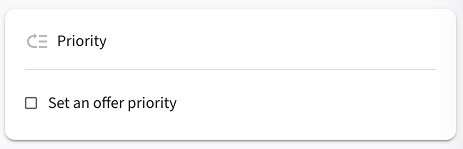 3. Check the **"Set an offer priority"** checkbox to enable priority settings
4. Enter your desired priority value in the input field (higher numbers = higher priority)
5. Use the up/down arrow buttons to increment or decrement the value
3. Check the **"Set an offer priority"** checkbox to enable priority settings
4. Enter your desired priority value in the input field (higher numbers = higher priority)
5. Use the up/down arrow buttons to increment or decrement the value
 Offers start with a default priority of 0 if none is specified. Discounts with
higher priority (higher numbers) will be applied first when multiple offers
are eligible for the same cart. Priority values range from 0-100.
## Offer Priority and Minimum Order Value
When an offer has a minimum order value (spend threshold), it applies only if the cart meets or exceeds that threshold. Priority determines which cart value the rule uses at evaluation time.
### How priority affects spend-based offers
Offers are evaluated in priority order (higher number = evaluated earlier). For spend thresholds, each offer reads the cart value at the moment it runs:
* **Higher-priority offers** evaluate against the original **order total** (pre-discount)
* **Lower-priority offers** evaluate against the **current order total** after higher-priority discounts have been applied
### Example: Priority Impact on Minimum Order Value
Let's say you have two offers:
1. **Spend USD 120, Get a Free Gift** (Priority 3 - higher priority)
2. **Buy More Save More: 30 percent off all items** (Priority 1 - lower priority)
**Customer's cart:** USD 150 worth of items
#### Scenario A: Current Priority Setup (Gift offer has higher priority)
1. **Gift offer evaluates first** -> Sees USD 150 **order total** -> **Qualifies** (at least USD 120) -> Free gift applied
2. **BMSM offer evaluates second** -> Sees USD 150 **order total** -> **Qualifies** -> 30 percent discount applied
**Result:** Customer gets both the free gift AND the 30 percent discount
#### Scenario B: Reversed Priorities (BMSM has higher priority)
1. **BMSM offer evaluates first** -> Sees USD 150 **order total** -> **Qualifies** -> 30 percent discount applied -> New **current order total**: USD 105
2. **Gift offer evaluates second** -> Sees USD 105 **current order total** -> **Does NOT qualify** (less than USD 120) -> No free gift
**Result:** Customer gets only the 30 percent discount, no free gift
### Strategic Priority Planning
**Use higher priorities (larger numbers) for offers you want to:**
* Apply to the original **order total**
* Ensure customers qualify for before other discounts reduce the total
* Maximize customer value (like free gifts or shipping)
**Use lower priorities (lower numbers) for offers that:**
* Can work with **order subtotals** (after higher-priority discounts)
* Are percentage-based discounts
* You want to apply after other promotions
### Quick Reference
| Priority Level | Spend threshold evaluated against | Best For |
| ---------------------------- | ------------------------------------------------- | ----------------------------------------------- |
| **Higher Priority (90-100)** | **Order total (original, pre-discount)** | Minimum spend offers, free gifts, free shipping |
| **Lower Priority (0-89)** | **Current order total (after earlier discounts)** | Percentage discounts, volume discounts |
## Qualifier Consumption Across Classes
Some offers use products in the cart as “qualifiers” to trigger a discount. When an item is used as a qualifier by an earlier-evaluated class, it may not be available to qualify another offer that runs later. Because Atom evaluates by class in this order — Item → Order → Shipping — item-level offers can consume qualifiers before order-level offers are evaluated.
## Qualifier Sharing and Discounted Lines
Some offers allow the same qualifying line to remain available for other offer checks, while others behave more exclusively. This matters most when a line both:
* helps qualify an offer
* receives a discount itself
* or participates in a second offer later in evaluation
### Quick Matrix
| Setting / outcome | What happens |
| ------------------------------------- | ---------------------------------------------------------------------------------------------------------------------------------- |
| **Qualifier sharing allowed** | The qualifying line can still participate in later compatible checks, subject to class, priority, and combination rules |
| **Qualifier sharing not allowed** | The line behaves more exclusively and may no longer be available to trigger another offer |
| **Line both qualifies and discounts** | Final behavior depends on the offer type plus sharing setting; review this whenever the same SKU is central to multiple promotions |
### BXGY or GWP Example
* Offer A: **Buy 2 candles, get a mini candle free**
* Offer B: **10% off candles**
If qualifier sharing is allowed:
* the 2 candles can unlock the gift
* the same candle lines may still participate in the compatible discount flow
If qualifier sharing is disabled:
* the qualifying candles are treated more exclusively
* the merchant may see the gift offer apply while the secondary discount no longer qualifies as expected
### Shipping / Free Shipping Example
* Offer A: **Spend USD 100 on eligible merchandise to get free shipping**
* Offer B: **Product discount on jackets**
If higher-priority item discounts reduce the current qualifying subtotal or if the same lines are treated exclusively, a later shipping offer may see a lower effective qualifying amount than the merchant expects.
That is why free shipping behavior should always be checked together with:
* qualifier sharing rules
* offer class order
* minimum cart value logic
* fulfillment exclusions
See [Discount Upsells](/upsells/overview) and [Fulfillment Type Exclusions](/fulfillment/overview) for the customer-facing effects.
### Scenario: BXGY item discount and an order discount share the same qualifier
* Setup:
* Item discount (BXGY): “Buy 1 Tan Shirt, get Jeans 50% off.”
* Order discount: “Buy a Tan Shirt, get 10% off your order.”
* Both are automatic and have the same priority.
* What happens:
* Item discounts run before order discounts. The Tan Shirt is used as a qualifier for the BXGY offer.
* When the order discount evaluates, the Tan Shirt has already been used as a qualifier, so the order discount does not apply.
* Guidance:
* If you want both to apply, avoid competing for the same qualifier. Options include using different qualifying conditions, adjusting priorities, or adding exclusions so each offer uses different qualifiers.
While the example above uses a Buy X Get Y offer, the same qualifier
consumption behavior applies to any item-level discount type.
## Discount Combinations
For code-based offers, you can configure which types of discounts can be combined together. This allows customers to benefit from the best possible total discount based on their cart.
### Setting Discount Combinations
To configure discount combinations for a code offer:
1. Navigate to the offer you want to configure
2. On the right side of the offer page, locate the **Combinations** card
3. Check the boxes for the discount classes you want this offer to combine with:
* **Product discounts** - Apply to specific items or collections
* **Order discounts** - Apply to cart subtotals
* **Shipping discounts** - Modify shipping costs
### Types of Valid Combinations
There are five types of discount combinations:
1. **Order discounts with shipping discounts**
2. **Product discounts with shipping discounts**
3. **Product discounts with other product discounts**
4. **Product discounts with order discounts**
5. **Order discounts with other order discounts**
### How Combinations Work
* **Multiple discounts can apply** to the same order when combinations are enabled
* **Order discounts are applied** on the current order total after product discounts have been applied
* **Automatic discounts** always allow combinations
* **Code discounts** require explicit combination configuration
> **Related**: See [Priority and Order Value Calculation](/offers/priority-and-stacking#offer-priority-and-minimum-order-value) to understand how priority affects which order total each discount sees during evaluation.
### Customer Experience
When customers enter multiple discount codes during checkout:
* **Compatible codes**: The best discount or combination of discounts automatically applies
* **Incompatible codes**: The message "Discount couldn't be used with your existing discounts" displays
Discount combinations can only be selected for code discounts. Automatic
discounts allow discount combinations by default.
## Stacking Rules
**Advanced Stacking Rules Coming Soon**
Atom supports sophisticated stacking controls to protect margins and avoid double-discounting. While the basic stacking behavior is already working, advanced stacking rules will be available in the admin UI soon.
### Current Stacking Behavior
* A product line receives **at most one item-level discount** (see [Priority Resolution](#conflict-resolution) for how conflicts are resolved)
* **Order-level and shipping discounts may stack** with one item-level discount when allowed by configuration
* **Priority determines evaluation order** within each discount class (see [How Offer Priority Works](#how-offer-priority-works))
### Coming Soon: Advanced Stacking Rules
When this feature launches, you'll be able to:
* **Create stacking rule groups** to control which discounts can be combined
* **Set exclusive discounts** that prevent other discounts from applying
* **Configure combination rules** between different discount types
* **Define stacking hierarchies** to ensure the most valuable discounts are prioritized
This will give you fine-grained control over how discounts interact, helping you maximize customer value while protecting your margins.
### Examples
1. Buy X Get Y (item-level) + Free Shipping (shipping):
* Result: Both may apply if the cart qualifies for each rule
* **Cross-reference**: See [Discount Combinations](/offers/priority-and-stacking#discount-combinations) for configuration details
2. Two item-level discounts target the same SKU:
* Result: The higher priority offer applies; the other is skipped on that line
* **Cross-reference**: See [Conflict Resolution](/offers/priority-and-stacking#conflict-resolution) for priority resolution logic
3. Order-level percent-off plus item-level percent-off:
* Result: Item-level applies to discounted lines; order-level applies to the remaining **current order total**
* **Cross-reference**: See [Priority and Order Value Calculation](/offers/priority-and-stacking#offer-priority-and-minimum-order-value) for evaluation order
## Practical Guidance
### Recommended Priority Strategy
TL;DR (set priorities fast and safely):
* Item discounts: Use higher numbers for mission-critical offers; only one item discount applies per line. Avoid sharing qualifiers with order discounts.
* Order discounts: Thresholds evaluate after item discounts. If relying on a product as a qualifier, don’t compete with item discounts for the same product.
* Shipping: Runs last; use priority to pick the single shipping incentive if multiples qualify.
* Ties: Same class + same priority → older offer evaluates first. Prefer unique priorities for critical offers; don’t rely on implicit tie-breaks.
## FAQs
**Can two BXGY offers apply to the same cart line?**
No. A line receives at most one item-level discount. If multiple are eligible, the highest priority number (highest priority) applies.
**How do budgets affect priority?**
Budgets and per-order caps are enforced after selection. If a cap is hit, the engine can fall back to the next eligible offer based on priority.
## See Also
* [Types of Offers](/offers/offer-types)
* [Creating Offers](/offers/creating-offers)
* [Scheduling](/offers/scheduling)
Offers start with a default priority of 0 if none is specified. Discounts with
higher priority (higher numbers) will be applied first when multiple offers
are eligible for the same cart. Priority values range from 0-100.
## Offer Priority and Minimum Order Value
When an offer has a minimum order value (spend threshold), it applies only if the cart meets or exceeds that threshold. Priority determines which cart value the rule uses at evaluation time.
### How priority affects spend-based offers
Offers are evaluated in priority order (higher number = evaluated earlier). For spend thresholds, each offer reads the cart value at the moment it runs:
* **Higher-priority offers** evaluate against the original **order total** (pre-discount)
* **Lower-priority offers** evaluate against the **current order total** after higher-priority discounts have been applied
### Example: Priority Impact on Minimum Order Value
Let's say you have two offers:
1. **Spend USD 120, Get a Free Gift** (Priority 3 - higher priority)
2. **Buy More Save More: 30 percent off all items** (Priority 1 - lower priority)
**Customer's cart:** USD 150 worth of items
#### Scenario A: Current Priority Setup (Gift offer has higher priority)
1. **Gift offer evaluates first** -> Sees USD 150 **order total** -> **Qualifies** (at least USD 120) -> Free gift applied
2. **BMSM offer evaluates second** -> Sees USD 150 **order total** -> **Qualifies** -> 30 percent discount applied
**Result:** Customer gets both the free gift AND the 30 percent discount
#### Scenario B: Reversed Priorities (BMSM has higher priority)
1. **BMSM offer evaluates first** -> Sees USD 150 **order total** -> **Qualifies** -> 30 percent discount applied -> New **current order total**: USD 105
2. **Gift offer evaluates second** -> Sees USD 105 **current order total** -> **Does NOT qualify** (less than USD 120) -> No free gift
**Result:** Customer gets only the 30 percent discount, no free gift
### Strategic Priority Planning
**Use higher priorities (larger numbers) for offers you want to:**
* Apply to the original **order total**
* Ensure customers qualify for before other discounts reduce the total
* Maximize customer value (like free gifts or shipping)
**Use lower priorities (lower numbers) for offers that:**
* Can work with **order subtotals** (after higher-priority discounts)
* Are percentage-based discounts
* You want to apply after other promotions
### Quick Reference
| Priority Level | Spend threshold evaluated against | Best For |
| ---------------------------- | ------------------------------------------------- | ----------------------------------------------- |
| **Higher Priority (90-100)** | **Order total (original, pre-discount)** | Minimum spend offers, free gifts, free shipping |
| **Lower Priority (0-89)** | **Current order total (after earlier discounts)** | Percentage discounts, volume discounts |
## Qualifier Consumption Across Classes
Some offers use products in the cart as “qualifiers” to trigger a discount. When an item is used as a qualifier by an earlier-evaluated class, it may not be available to qualify another offer that runs later. Because Atom evaluates by class in this order — Item → Order → Shipping — item-level offers can consume qualifiers before order-level offers are evaluated.
## Qualifier Sharing and Discounted Lines
Some offers allow the same qualifying line to remain available for other offer checks, while others behave more exclusively. This matters most when a line both:
* helps qualify an offer
* receives a discount itself
* or participates in a second offer later in evaluation
### Quick Matrix
| Setting / outcome | What happens |
| ------------------------------------- | ---------------------------------------------------------------------------------------------------------------------------------- |
| **Qualifier sharing allowed** | The qualifying line can still participate in later compatible checks, subject to class, priority, and combination rules |
| **Qualifier sharing not allowed** | The line behaves more exclusively and may no longer be available to trigger another offer |
| **Line both qualifies and discounts** | Final behavior depends on the offer type plus sharing setting; review this whenever the same SKU is central to multiple promotions |
### BXGY or GWP Example
* Offer A: **Buy 2 candles, get a mini candle free**
* Offer B: **10% off candles**
If qualifier sharing is allowed:
* the 2 candles can unlock the gift
* the same candle lines may still participate in the compatible discount flow
If qualifier sharing is disabled:
* the qualifying candles are treated more exclusively
* the merchant may see the gift offer apply while the secondary discount no longer qualifies as expected
### Shipping / Free Shipping Example
* Offer A: **Spend USD 100 on eligible merchandise to get free shipping**
* Offer B: **Product discount on jackets**
If higher-priority item discounts reduce the current qualifying subtotal or if the same lines are treated exclusively, a later shipping offer may see a lower effective qualifying amount than the merchant expects.
That is why free shipping behavior should always be checked together with:
* qualifier sharing rules
* offer class order
* minimum cart value logic
* fulfillment exclusions
See [Discount Upsells](/upsells/overview) and [Fulfillment Type Exclusions](/fulfillment/overview) for the customer-facing effects.
### Scenario: BXGY item discount and an order discount share the same qualifier
* Setup:
* Item discount (BXGY): “Buy 1 Tan Shirt, get Jeans 50% off.”
* Order discount: “Buy a Tan Shirt, get 10% off your order.”
* Both are automatic and have the same priority.
* What happens:
* Item discounts run before order discounts. The Tan Shirt is used as a qualifier for the BXGY offer.
* When the order discount evaluates, the Tan Shirt has already been used as a qualifier, so the order discount does not apply.
* Guidance:
* If you want both to apply, avoid competing for the same qualifier. Options include using different qualifying conditions, adjusting priorities, or adding exclusions so each offer uses different qualifiers.
While the example above uses a Buy X Get Y offer, the same qualifier
consumption behavior applies to any item-level discount type.
## Discount Combinations
For code-based offers, you can configure which types of discounts can be combined together. This allows customers to benefit from the best possible total discount based on their cart.
### Setting Discount Combinations
To configure discount combinations for a code offer:
1. Navigate to the offer you want to configure
2. On the right side of the offer page, locate the **Combinations** card
3. Check the boxes for the discount classes you want this offer to combine with:
* **Product discounts** - Apply to specific items or collections
* **Order discounts** - Apply to cart subtotals
* **Shipping discounts** - Modify shipping costs
### Types of Valid Combinations
There are five types of discount combinations:
1. **Order discounts with shipping discounts**
2. **Product discounts with shipping discounts**
3. **Product discounts with other product discounts**
4. **Product discounts with order discounts**
5. **Order discounts with other order discounts**
### How Combinations Work
* **Multiple discounts can apply** to the same order when combinations are enabled
* **Order discounts are applied** on the current order total after product discounts have been applied
* **Automatic discounts** always allow combinations
* **Code discounts** require explicit combination configuration
> **Related**: See [Priority and Order Value Calculation](/offers/priority-and-stacking#offer-priority-and-minimum-order-value) to understand how priority affects which order total each discount sees during evaluation.
### Customer Experience
When customers enter multiple discount codes during checkout:
* **Compatible codes**: The best discount or combination of discounts automatically applies
* **Incompatible codes**: The message "Discount couldn't be used with your existing discounts" displays
Discount combinations can only be selected for code discounts. Automatic
discounts allow discount combinations by default.
## Stacking Rules
**Advanced Stacking Rules Coming Soon**
Atom supports sophisticated stacking controls to protect margins and avoid double-discounting. While the basic stacking behavior is already working, advanced stacking rules will be available in the admin UI soon.
### Current Stacking Behavior
* A product line receives **at most one item-level discount** (see [Priority Resolution](#conflict-resolution) for how conflicts are resolved)
* **Order-level and shipping discounts may stack** with one item-level discount when allowed by configuration
* **Priority determines evaluation order** within each discount class (see [How Offer Priority Works](#how-offer-priority-works))
### Coming Soon: Advanced Stacking Rules
When this feature launches, you'll be able to:
* **Create stacking rule groups** to control which discounts can be combined
* **Set exclusive discounts** that prevent other discounts from applying
* **Configure combination rules** between different discount types
* **Define stacking hierarchies** to ensure the most valuable discounts are prioritized
This will give you fine-grained control over how discounts interact, helping you maximize customer value while protecting your margins.
### Examples
1. Buy X Get Y (item-level) + Free Shipping (shipping):
* Result: Both may apply if the cart qualifies for each rule
* **Cross-reference**: See [Discount Combinations](/offers/priority-and-stacking#discount-combinations) for configuration details
2. Two item-level discounts target the same SKU:
* Result: The higher priority offer applies; the other is skipped on that line
* **Cross-reference**: See [Conflict Resolution](/offers/priority-and-stacking#conflict-resolution) for priority resolution logic
3. Order-level percent-off plus item-level percent-off:
* Result: Item-level applies to discounted lines; order-level applies to the remaining **current order total**
* **Cross-reference**: See [Priority and Order Value Calculation](/offers/priority-and-stacking#offer-priority-and-minimum-order-value) for evaluation order
## Practical Guidance
### Recommended Priority Strategy
TL;DR (set priorities fast and safely):
* Item discounts: Use higher numbers for mission-critical offers; only one item discount applies per line. Avoid sharing qualifiers with order discounts.
* Order discounts: Thresholds evaluate after item discounts. If relying on a product as a qualifier, don’t compete with item discounts for the same product.
* Shipping: Runs last; use priority to pick the single shipping incentive if multiples qualify.
* Ties: Same class + same priority → older offer evaluates first. Prefer unique priorities for critical offers; don’t rely on implicit tie-breaks.
## FAQs
**Can two BXGY offers apply to the same cart line?**
No. A line receives at most one item-level discount. If multiple are eligible, the highest priority number (highest priority) applies.
**How do budgets affect priority?**
Budgets and per-order caps are enforced after selection. If a cap is hit, the engine can fall back to the next eligible offer based on priority.
## See Also
* [Types of Offers](/offers/offer-types)
* [Creating Offers](/offers/creating-offers)
* [Scheduling](/offers/scheduling)