> ## Documentation Index
> Fetch the complete documentation index at: https://docs.atomcommerce.io/llms.txt
> Use this file to discover all available pages before exploring further.
# Discount Limits
> Control how discounts interact with each other and prevent excessive discount stacking
TL;DR
-
Multiple Users Per Order: Control whether the same discount can be applied multiple times in a single order
-
Shared Qualifier Exclusion: Control whether this offer excludes lines already used to qualify another offer
-
Margin Protection: Prevent excessive discount stacking that could erode profits
-
Customer Experience: Balance generous promotions with business sustainability
## What are Discount Limits?
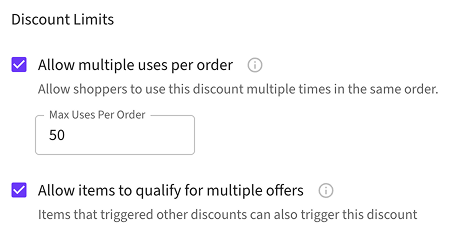
Discount limits control how discounts interact with each other in your store. These settings help you balance customer satisfaction with business profitability.
## Key Concepts
### Multiple Users Per Order
Controls whether the same discount can be applied multiple times within a single order.
### Qualifier Reuse
Controls whether items that have already qualified for one offer can also qualify for other offers.
## Why Use Discount Limits?
Prevent excessive discount stacking that could erode your profit margins
Maintain predictable discount costs and avoid unexpected promotional expenses
Balance generous promotions with sustainable business practices
Fine-tune discount behavior for different business scenarios
## When to Use Each Setting
### Enable Multiple Users Per Order When:
* You want the same discount to apply multiple times in one order
* Multiple customers or use cases should benefit from the same promotion
### Enable Qualifier Reuse When:
* You want customers to receive multiple gifts from the same qualifying items
* You're running generous holiday campaigns or special promotions
### Keep Limits Disabled When:
* You need to protect profit margins from excessive discounting
* You want to maintain predictable promotional costs
## Getting Started
1. **Navigate to your offer** in the Atom admin interface
2. **Locate the Discount Limits section** on the offer configuration page
3. **Configure your desired settings** based on your business needs
4. **Test your configuration** to ensure it behaves as expected
 ## Related Topics
* [Allow Multiple Users Per Order](/discount-limits/multiple-users-per-order) - Detailed guide on managing multiple discount applications
* [Exclude Items Already Used to Qualify for Another Offer](/discount-limits/qualifier-reuse) - Complete guide to shared qualifier behavior
* [Offer Priority and Stacking](/offers/priority-and-stacking) - How offers are evaluated and applied
* [Creating Offers](/offers/creating-offers) - Learn how to create effective discount offers
## Best Practices
Start with conservative settings (limits enabled) and gradually relax them based on your business performance and customer feedback.
* **Test thoroughly** before launching new discount configurations
* **Monitor performance** to ensure limits are achieving your business goals
* **Consider your margins** when enabling more generous discount behaviors
* **Use analytics** to track the impact of your discount limit settings
## Related Topics
* [Allow Multiple Users Per Order](/discount-limits/multiple-users-per-order) - Detailed guide on managing multiple discount applications
* [Exclude Items Already Used to Qualify for Another Offer](/discount-limits/qualifier-reuse) - Complete guide to shared qualifier behavior
* [Offer Priority and Stacking](/offers/priority-and-stacking) - How offers are evaluated and applied
* [Creating Offers](/offers/creating-offers) - Learn how to create effective discount offers
## Best Practices
Start with conservative settings (limits enabled) and gradually relax them based on your business performance and customer feedback.
* **Test thoroughly** before launching new discount configurations
* **Monitor performance** to ensure limits are achieving your business goals
* **Consider your margins** when enabling more generous discount behaviors
* **Use analytics** to track the impact of your discount limit settings